Based on current carrier enforcement, the MVNO loophole appears permanently closed.
If you have a T-Mobile locked phone and just tried to activate it on Mint Mobile, Tello, or any other MVNO, you already know: it does not work. The same trick that let millions of people use carrier-locked phones on MVNOs sharing the same network has been shut down, and based on carrier actions and FCC rulings over the past 18 months, there is no indication it will return. T-Mobile, Verizon, and AT&T have all moved toward stricter carrier lock policies, IMEI-based device blocking, and longer unlock timelines.
This is the most comprehensive guide to locked phone MVNO compatibility in 2026. It covers what changed, which carriers are affected, how the new unlock policies compare, and what both consumers and MVNO operators should do about it.
No. As of 2026, major U.S. carriers block locked phones from activating on MVNOs using IMEI-based restrictions. T-Mobile locked devices will not work on Mint Mobile, Tello, or Simple Mobile, and Verizon and AT&T enforce similar policies. You must fully unlock your device before switching to any MVNO.
What Is a Locked Phone?
A locked phone is a mobile device programmed by a carrier to only accept SIM cards from that carrier’s network. If you insert a SIM from another carrier or MVNO, the phone displays a “SIM not supported” error, shows a lock icon, or refuses to connect entirely.
Locked phone meaning in practice: You bought it from T-Mobile, Verizon, or AT&T (usually at a discount or $0 down), and the carrier restricts it to their network until you meet specific unlock requirements like paying off the device and completing a minimum service period.
This matters because carrier locked phone compatibility with MVNOs used to have exceptions. Those exceptions no longer exist.
TL;DR: Can You Use a Locked Phone on an MVNO in 2026?
No. Here is the full picture in six points:
- T-Mobile locked phones no longer work on T-Mobile MVNOs like Mint Mobile, Tello, or Simple Mobile. The carrier closed this loophole using IMEI-based enforcement.
- Verizon scrapped its 60-day auto-unlock. As of January 2026, postpaid devices must be fully paid off before unlocking, and prepaid devices require 365 days of active service. Online payoffs trigger an additional 35-day wait.
- AT&T maintains relatively shorter timelines at 60 days for postpaid and 6 months for prepaid, though full payment is still required.
- All three carriers now use IMEI-level blocking to prevent locked devices from activating on partner MVNOs.
- The safest move for consumers: buy unlocked phones directly from Apple, Samsung, or Google.
- MVNOs must overhaul onboarding with pre-signup IMEI checks, device programs, and eSIM-first activation to protect conversions.
How Carriers Quietly Tightened Phone Locks
Between 2025 and 2026, carrier locked phone policies changed rapidly, marking a long term shift in how restrictions work across the industry.
The first signs appeared in 2023 when T-Mobile began blocking locked devices on MVNOs, and by 2025 these restrictions were being widely enforced and reported.
The biggest change came in January 2026 when the FCC removed Verizon’s 60 day unlock requirement, allowing stricter rules. Soon after, Verizon introduced a 365 day lock for prepaid users and required postpaid devices to stay locked until fully paid off. It also added a 35 day delay for some unlocks even after payment, making switching carriers slower
Overall, every major US carrier has tightened policies, and using locked phones on MVNOs is no longer as easy as it once was.
Why Your Phone Doesn’t Work on Mint Mobile (T-Mobile Lock Explained)
If you just bought a Mint Mobile SIM, inserted it into your T-Mobile phone, and got a “SIM not supported” or “network locked” error, here is what happened.
Mint Mobile runs on T-Mobile’s network. Until recently, that meant a T-Mobile locked phone would connect to Mint without issues because it was technically still on the same towers. That workaround no longer works. T-Mobile now checks the IMEI of every device at the network authentication level and blocks any device that is still locked, even if the MVNO uses T-Mobile infrastructure.
This affects: Mint Mobile, Tello, Simple Mobile, Ultra Mobile, and every other T-Mobile MVNO.
This does not affect: Phones that are already unlocked. If you bought your phone directly from Apple, Samsung, Google, or had it unlocked by T-Mobile, Mint Mobile will work fine.
What to do right now:
- Check your lock status: dial *#06# to get your IMEI, then use T-Mobile’s Device Unlock app or Mint’s BYOD checker.
- If locked: follow the T-Mobile unlock steps below (40 days + paid off for postpaid, 365 days for prepaid).
- If you cannot wait: buy an unlocked phone from the manufacturer and activate it on Mint immediately.
This is not a Mint Mobile problem. It is a T-Mobile enforcement decision, and Mint cannot override it. Understanding how MVNO networks actually work explains why the MVNO has no power to fix this.
The T-Mobile MVNO Lock: Full Timeline and Technical Detail
The Mint Mobile section above covers the consumer impact. Here is the deeper story for anyone researching “T-Mobile locked phone restrictions MVNO” or building an MVNO strategy around this shift.
How T-Mobile Closed the Loophole
T-Mobile updated its network authentication to perform IMEI-level lock checks on all connection requests, including those routed through MVNO partners. The rollout was gradual: Samsung devices blocked around mid-2023, Google Pixel phones next, then all remaining brands. T-Mobile’s official SIM unlock policy page confirms that locked devices will not operate on other networks without first being unlocked.
By June 2025, the block was confirmed across Mint Mobile, Tello, and Simple Mobile. Reddit user ken830’s experience captured the frustration: they purchased two Motorola Edge (2024) phones for use on Mint and Tello, only to discover both were completely blocked. Older Samsung phones on the same account, acquired through a T-Mobile trade-in years earlier, still worked. The cutoff was device-specific and date-dependent.
If you purchased a T-Mobile phone in the last two years, it will almost certainly not activate on any T-Mobile MVNO. You must either pay off the device and request an unlock (40 days for postpaid, 365 days for prepaid), or purchase a fully unlocked phone. There is no workaround.
What This Means Going Forward
T-Mobile’s enforcement shows no signs of softening. The carrier now owns Mint Mobile and Ultra Mobile outright (acquired in 2024), which means it controls both the lock policy and the MVNO. The locked-phone block serves T-Mobile’s interest in keeping subsidized-device customers on its own postpaid plans. Given that T-Mobile has been tightening this policy progressively since 2023, a reversal appears unlikely.
Verizon’s 2026 Policy Shift: From 60 Days to a Full Year
Verizon’s change was the most dramatic single policy shift in recent carrier history.

What Happened
Until January 2026, Verizon automatically unlocked all devices after 60 days. This was legally mandated by an FCC condition attached to Verizon’s 700 MHz C-Block spectrum purchase. In January 2026, the FCC granted Verizon a waiver (DA 26-43), citing fraud concerns. Verizon’s updated device unlocking policy took effect on February 18, 2026.
Within days, Verizon implemented a new structure:
- Postpaid: Devices remain locked until fully paid off. A 35-day delay applies if payment is made online or through the Verizon app. Instant unlock requires paying at a Verizon retail store with a secure payment method (chip credit card, cash, or contactless).
- Prepaid (Visible, TracFone, Total Wireless, StraightTalk): 365 days of paid, active service required. No exceptions. Unlock must be manually requested.
Verizon reported losing an estimated 784,703 devices to fraud in 2023 alone, according to filings with the FCC. After acquiring TracFone and reducing its one-year lock to 60 days, Verizon saw fraud spike by approximately 55%. The FCC accepted this as sufficient justification.
The Consumer Backlash
Verizon’s own earnings showed a 32.6% decline in operating income. Customer churn among postpaid subscribers hit 0.95%, higher than previous quarters. CEO Dan Schulman attributed it partly to “price increases without corresponding value.” Consumers flooded Reddit with complaints. The new lock policy added fuel to an already smoldering relationship.
Even after you pay off your Verizon phone in full online, there is typically a 35-day delay before the unlock is processed. The only way to bypass this wait is to pay the balance in-store using a chip credit card, cash, or contactless payment. Plan ahead if you need your device unlocked on a deadline.
AT&T: The Least Restrictive Option (For Now)

AT&T has not made dramatic changes to its device unlock policy, which positions it as the most consumer-friendly of the Big Three for people planning to move to an MVNO.
- Postpaid: 60 days after purchase, device paid in full, account current.
- Prepaid: 6 months of paid AT&T service.
Auto-unlock available: Eligible Apple, Samsung, and Google devices on AT&T Wireless unlock automatically once requirements are met.
AT&T’s 60-day postpaid unlock timeline is the shortest among major carriers. If you plan to switch to an MVNO later, AT&T offers the fastest path to unlocking.
Should I Unlock My Phone or Buy a New One? (Decision Guide)
Use this table to find your best action in 10 seconds.
| Your Situation | Best Action | Timeline |
|---|---|---|
| Phone already paid off | Request unlock from your carrier | Days to weeks |
| Owe less than $200 | Pay off balance, then request unlock | 1–5 weeks depending on carrier |
| Owe more than $200 | Buy a new unlocked phone instead | Immediate |
| On Verizon prepaid | Buy unlocked (365-day lock, no shortcut) | Immediate |
| On T-Mobile prepaid | Buy unlocked (365-day lock or $100+ refills required) | Immediate |
| On AT&T postpaid, 60+ days in | Pay off and request unlock | 1–2 weeks |
| Need MVNO access today | Buy unlocked from Apple, Samsung, or Google | Same day |
If you plan to use an MVNO at any point, buy your next phone unlocked directly from the manufacturer. iPhones from apple.com, Pixels from the Google Store, and Samsung phones from samsung.com all come carrier-free. You pay full price upfront, but gain complete flexibility from day one.
Check Your Phone Before You Switch (Takes 10 Seconds)
This is the step most people skip, and it is the step that prevents the most frustration.
Before you sign up for any MVNO, before you order a SIM or eSIM, check whether your phone is compatible. Every reputable MVNO offers an online IMEI compatibility checker. Here is how:
- Find your IMEI: Dial *#06# on your phone. The 15-digit number displayed is your IMEI.
- Go to the MVNO’s website and look for their BYOD or compatibility check tool.
- Enter your IMEI and submit.
- Read the result carefully. “Compatible” means unlocked and supported. A failure means the phone is likely locked, blacklisted, or incompatible with the network bands.
This takes 10 seconds. It saves you from ordering a SIM that will not work, opening a support ticket, and waiting for a refund.
A large share of MVNO activation failures comes from attempting to activate locked devices. Do not assume your phone is unlocked because it is old, because you finished your contract, or because you bought it secondhand. Always check the IMEI before switching. Every time.
If you are an MVNO operator, this is why building compatibility checks into your signup flow is non-negotiable. Learn how smart BYOD onboarding protects your conversion rates.
Why Carriers Are Locking Down: The Three Real Reasons
Carriers frame these changes as fraud prevention. That is partly true. But fraud is the public justification, not the full explanation.
1. Protecting Device Subsidies
Carriers sell $1,000+ phones at $0 down. If a customer takes that phone to an MVNO two months later, the carrier loses the subscriber and the subsidy recovery. Verizon told the FCC it lost 784,703 devices to fraud in 2023. After reducing TracFone’s one-year lock to 60 days, fraud spiked 55%.
2. Fighting MVNO Migration
According to a WhistleOut survey, 58% of Big Three customers are considering switching carriers, and 34% may switch to an MVNO within the next year. Based on those numbers, WhistleOut estimated the Big Three could be at risk of losing up to 230 million customers combined. Locking phones longer is the simplest way to slow this migration.
3. Controlling the Ecosystem
Lock policies let MNOs dictate which devices activate, when, and on whose terms. This protects wholesale pricing leverage, manages network quality tiers, and reinforces bargaining power over MVNO partners.
Fraud is a real issue, and carrier reports support that. But fraud alone does not explain why T-Mobile blocks its own locked devices from activating on MVNOs it owns, such as Mint Mobile.
The pattern across all major carriers suggests a broader strategy: reduce churn to MVNOs and protect ARPU on premium postpaid plans. MVNOs that fail to account for this dynamic will continue losing customers at the activation stage.
How IMEI Blocking Works: A Technical Primer for MVNO Teams
When a device attempts to register on a mobile network, it presents its IMEI during the authentication handshake. The network’s HLR (Home Location Register) or HSS (Home Subscriber Server) checks this IMEI against multiple databases:
- Lock status database: Is this device locked? Is the requesting network authorized?
- Blacklist database (GSMA IMEI Database): Reported lost, stolen, or associated with fraud?
- Payment status database: Active installment plan?
If the IMEI is flagged as locked and the MVNO is not authorized, registration is rejected. The phone may briefly show signal bars but cannot complete authentication. For MVNO operators, pre-activation IMEI checks are the primary defense against this.
The Business Impact of MVNO Locked Phones
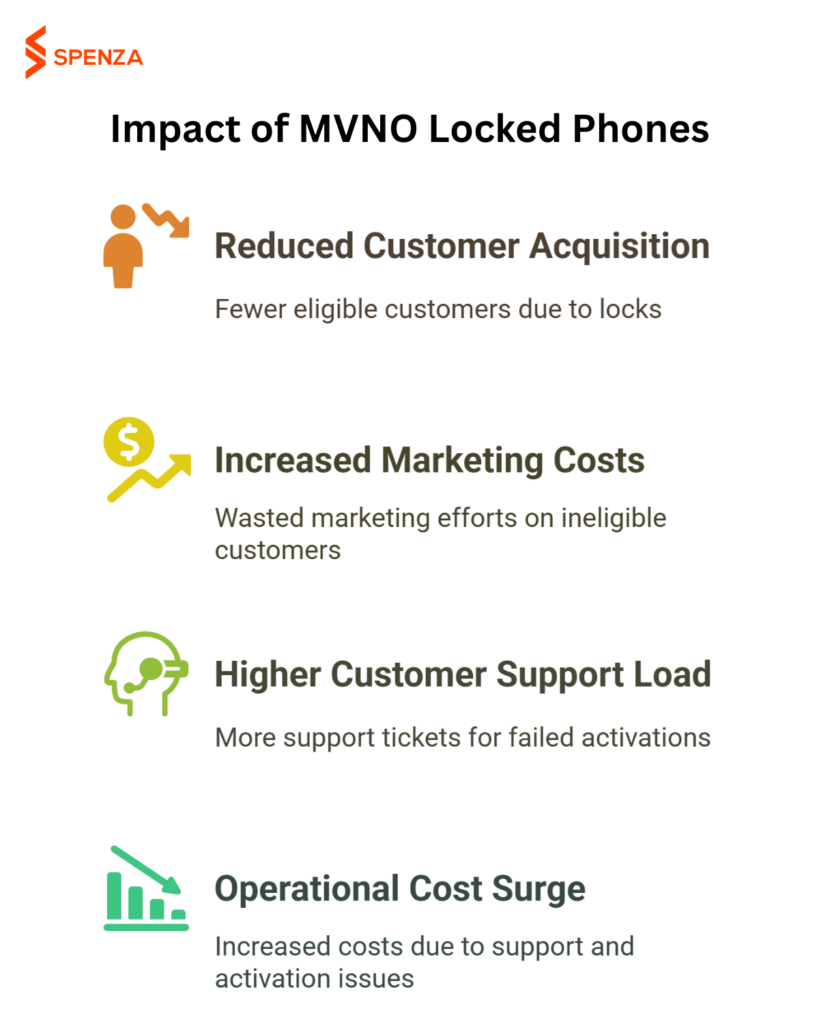
This is not a support-team problem. It is an existential business model problem.
- Activation failures are climbing. When Sprint deployed a new validation system, its MVNO partner Ting saw 70% of activations rejected overnight. The current T-Mobile and Verizon enforcement wave creates a similar pattern across the industry.
- Customer acquisition costs are spiking. Marketing spend reaches people who carry locked devices and cannot convert. Conversion rates drop, cost per acquisition inflates, margins get crushed.
- Support volume explodes. Every failed activation becomes a ticket. Agents explain a problem they cannot fix. Call times increase, agents burn out, costs climb.
- Brand trust erodes. A customer who signs up, receives a SIM, inserts it, and sees a lock screen blames your MVNO, not their old carrier. That first impression is nearly impossible to recover.
The global MVNO market is projected to hit $195 billion by 2034. The U.S. market alone is at $47 billion. Growth means nothing if locked-phone failures kill conversions at the front door.
Solutions for Consumers: How to Unlock Your Locked Phone Step by Step
T-Mobile Postpaid Unlock
- Ensure 40+ days of active T-Mobile service on the requesting line.
- Pay off any remaining device balance.
- Open the T-Mobile Device Unlock app (Android) or contact support (iPhone).
- Select “Permanent Unlock” and follow prompts.
- Restart your device.
T-Mobile Prepaid Unlock
- Wait 365 days from activation, or accumulate $100+ in refills.
- Contact T-Mobile support to request.
Verizon Postpaid Unlock
- Pay off the device balance in full.
- Instant unlock: Pay at a Verizon store using chip credit card, cash, or contactless.
- Online payoff: Wait 35 days after payment clears.
Verizon Prepaid Unlock
- Maintain 365 days of paid, active service.
- Request unlock after the waiting period.
AT&T Postpaid Unlock
- Device purchased 60+ days ago.
- Installment balance paid to zero.
- Visit att.com/deviceunlock or use the AT&T Device Unlock app.
AT&T Prepaid Unlock
- Maintain 6 months of paid AT&T service.
- Submit unlock requests online or through the app.
iPhones from apple.com, Pixels from the Google Store, and Samsung phones from samsung.com come SIM-free and carrier-unlocked out of the box. You pay full retail price, but avoid lock restrictions, unlock delays, and future carrier policy changes.
Solutions for MVNO Operators: Protecting Your Business in 2026
1. Make IMEI Checks Mandatory Before Payment
Do not let customers reach the checkout without verifying their device. A robust IMEI check should confirm lock status, blacklist status, network band compatibility, and eSIM support. Catching a locked device after payment creates a refund, a ticket, and a lost customer. Catching it before creates an opportunity to educate and convert.
If a customer completes payment, receives a SIM, and then discovers their phone is locked, you now have three problems: a refund, a support case, and a customer who tells others your service “doesn’t work”. Pre-checkout IMEI validation eliminates all three.
2. Build Device Intelligence Into Your Onboarding
Go beyond basic IMEI lookups. Integrate device eligibility APIs for real-time lock status, payment history, and carrier identification. This powers smarter signup flows. Explore how Spenza’s connectivity platform helps MVNOs build smart onboarding.
3. Change Your Marketing Language
Stop saying “Bring Your Phone.” Start saying “Bring Your Unlocked Phone.”
One word changes your entire funnel. It filters out ineligible customers before signup and sets honest expectations.
4. Launch a Device Program
The pure BYOD model is no longer sustainable as a sole channel. Control the device supply: sell unlocked phones with your plans, offer refurbished devices at lower prices, partner with financing providers for “$0 down” options. This creates revenue and solves the lock problem at the source. See more on MVNO revenue strategies beyond BYOD.
5. Go eSIM-First
eSIM does not bypass a lock. But it eliminates the cost and friction of shipping a physical SIM that will not work. Lock failures surface instantly at zero logistics cost. If you are not offering eSIM onboarding yet, you are behind. Learn how eSIM transforms the enterprise BYOD experience.
6. Train Support as Carrier Policy Experts
Agents need the exact unlock requirements for every carrier, postpaid and prepaid. They should walk customers through the process and know when to redirect versus offer a device alternative.
How Spenza Helps MVNOs Navigate Locked-Device Challenges
Spenza is an operator-neutral connectivity enablement platform built for MVNOs dealing with exactly these problems.
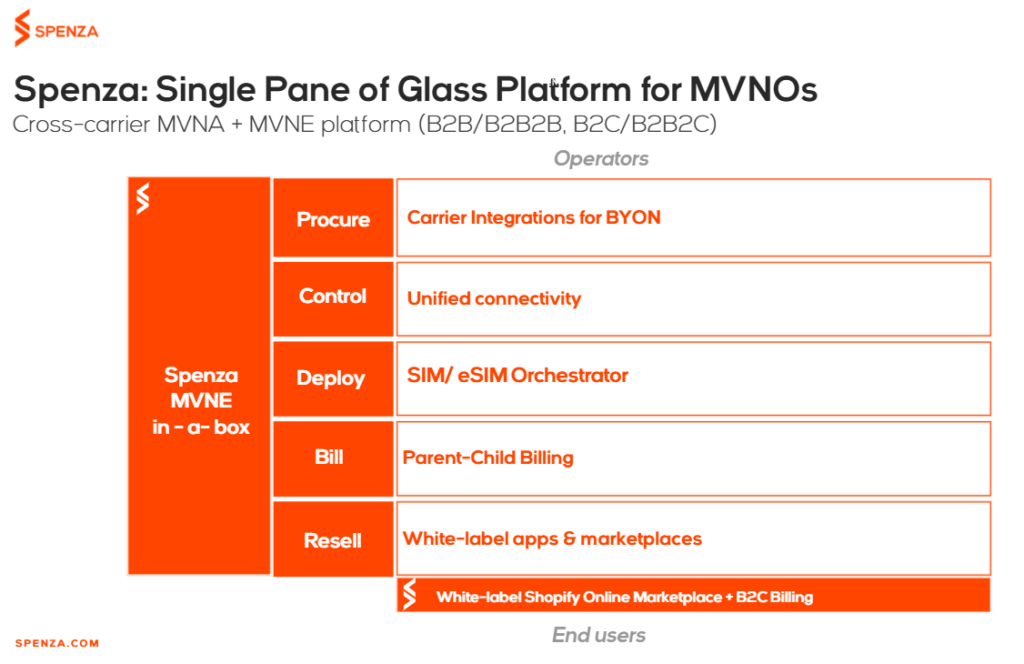
With Spenza, you can:
- Multi-Carrier Access: Connect to plans from multiple MNOs, MVNOs, and IoT platforms. Reduce dependency on any single carrier and avoid lock-in risks.
- Launch Device Programs Faster: Deploy and resell unlocked devices with white-label apps and Shopify integration. Bundle devices with tailored mobile plans for new revenue streams.
- Unified Operations Dashboard: Manage subscribers, billing, spend, and compliance from a single pane of glass. Monitor activations, flag lock issues, and resolve them quickly.
- Smart Onboarding: Integrate IMEI checks and real-time compatibility verification directly into your signup flow. Reduce failures and improve customer experience.
- Build Flexible Offers Instantly: Access a curated marketplace of plans. Create customized bundles that fit your customers’ needs.
Don’t let the locked-device challenge dictate your future. Turn it into your competitive advantage.
Conclusion: From Constraint to Competitive Edge
Device locking is no longer a temporary hurdle. It is a structural shift in how the wireless ecosystem operates. MVNOs that treat it as a short-term inconvenience will continue to face rising friction in acquisition, activation, and customer trust.
At the same time, market demand is accelerating. The global MVNO market is on track to nearly double over the next decade, driven by customers seeking flexibility and better pricing. Yet as demand grows, so do the barriers to entry. Carriers are tightening control, not loosening it.
This creates a clear divide.
Operators that rely purely on bring your own device models will find growth increasingly constrained. In contrast, those that take control of the full customer journey, from device to activation, will unlock faster growth and stronger retention. Ownership of the device pipeline, proactive compatibility checks, and operational visibility are becoming core requirements, not optional capabilities.
The opportunity is not just to overcome lock policies, but to use them to build trust. When you eliminate uncertainty, reduce activation failures, and guide customers with clarity, you create a better experience than the incumbents themselves.
The next generation of MVNOs will not win by being cheaper alone. They will win by being more reliable, more transparent, and easier to do business with.
The shift is already happening. The advantage goes to those who move first.
Discover how to launch and scale your MVNO faster with Spenza.
FAQs
Schedule a free demo with Spenza today to discover how our platform can help you build a profitable MVNO.