Launching an MVNO with Spenza means configuring an agreed mobile service, connecting the customer journey and proving that operations work before opening sales. A seven-day configuration plan can organize that work, but it is not evidence that every business can complete an MVNO launch in seven days. Network access, commercial approval, device support and operating readiness must be assessed separately.
This walkthrough preserves the practical account, catalog and subscription steps from Spenza’s published implementation material. It distinguishes those documented steps from current interface details that still need confirmation. If you are choosing the business model first, begin with the MVNO guide, then return with a defined service and accountable launch team.
What You Need Before a 7-Day MVNO Launch
A short Spenza implementation window requires an agreed service scope and completed prerequisites before configuration starts. Confirm the customer offer, permitted network services, supported devices, commercial terms, brand assets and operating owners. Treat missing approvals or integrations as open dependencies, rather than assuming a platform account makes the business ready to launch.
Write down the first release: who can buy, where service is available, which devices are supported, what the plan includes and how customers obtain help. A constrained release is easier to evaluate than an undefined promise of global service. Select the MVNO operating model before deciding which systems your team will build or retain.
Configuration starts when the inputs are usable, not when the first meeting is booked. Use this proposed entry checklist to identify work that belongs before the implementation window.
| Input | What the business supplies | What to confirm with delivery |
|---|---|---|
| Service and network scope | Markets, devices, voice/data/messaging needs | Eligible offers, access arrangement and restrictions |
| Commercial offer | Retail plans, terms and customer journey | Supported configuration and billing treatment |
| Store and brand | Authorized store access, assets and approved copy | Integration route, permissions and environment |
| Operations | Named product, finance, support and release owners | Responsibilities, escalation and acceptance evidence |
Source: implementation inputs consolidated from the three source articles. This is a planning checklist, not a measured delivery benchmark.
Spenza’s published material describes platform configuration, plan and subscription management, network integration and support coordination. Verify the exact functions in your proposed agreement. Bringing an existing operator relationship still requires technical and commercial compatibility; marketplace availability does not establish permission to sell every plan to every audience.
Discuss your MVNO operating model with Spenza using the entry checklist. The provider evaluation guide helps turn the agreed scope into acceptance criteria.
Linking Spenza Account with Shopify Store
Spenza’s published Shopify walkthrough connects a business account to a merchant store, imports selected plans, publishes products and inspects resulting subscription records. Use that sequence as the implementation reference. The screenshots below are existing published examples, not a verification of today’s interface, available plans, prices or production environment.
Connect the authorized account and app
The source walkthrough places the merchant connection under Settings → Account Management → Shopify Merchant in the Spenza business account. It describes selecting Connect and entering the store address. Confirm the current labels and required permissions with delivery, and use an authorized test store or agreed environment for initial work.
The next published step installs the Spenza app through the Shopify admin and opens it from Apps, then signs in to the business account. Verify the current installation route and requested access before granting permissions. Record which store and Spenza account are connected so testing cannot be confused with another merchant environment.
Import a scoped catalog and publish deliberately
The walkthrough then selects plans from the Spenza Marketplace and adds them to the Shopify product catalog. Check each product’s description, eligibility, retail price, renewal terms and supported service against the approved offer. Do not treat the example plans or prices in older screenshots as a current catalog.
In Shopify Products, organize the imported items into the intended collections and make them available to the appropriate sales channel. Review the customer-facing page on mobile and desktop before enabling purchases. Publication makes a product visible; it does not prove that downstream provisioning or recurring billing is ready.
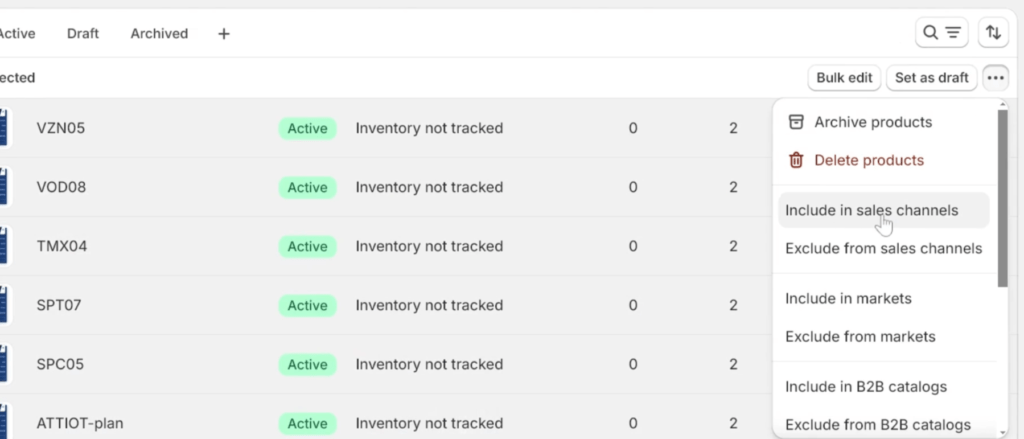
Shopify’s subscription guidance describes recurring purchase options and subscription-app management. Confirm how the proposed Spenza configuration relates to those mechanisms. A recurring storefront purchase and a telecom subscription record need an explicit mapping; matching names in two dashboards are not sufficient evidence.
Inspect the service record after the order
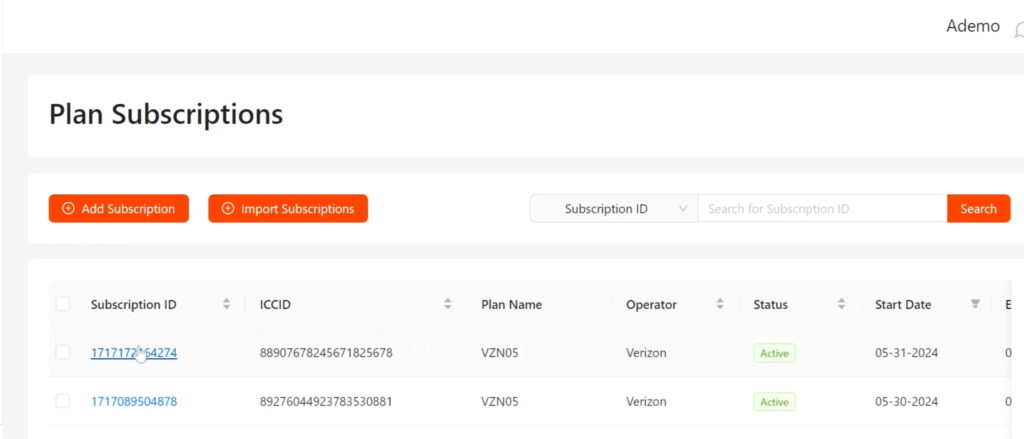
The published Spenza flow uses Phone Lines and Subscriptions to inspect the records created through the purchase journey. Trace the test order to the intended account, plan and subscription identifier. Verify state and effective dates against the actual service result, then confirm that support can find the same history.
A Proposed Seven-Day Implementation Schedule
A seven-day Spenza schedule is useful as a proposed sequence of configuration and review tasks after prerequisites are complete. The schedule below assigns an output to each workday without claiming that a customer achieved it. Extend the plan whenever testing, approvals, delivery dependencies or operational preparation require more time.
Each workday ends with an artifact the next task can use. Dates should be agreed by the delivery team against the actual scope; parallel work does not remove dependencies.
| Proposed workday | Work package | Exit artifact |
|---|---|---|
| 1 | Confirm scope, owners and brand configuration | Approved release brief and dependency register |
| 2 | Configure eligible plans and retail catalog | Reviewed product and pricing records |
| 3 | Connect store and customer journey | Recorded account mapping and storefront review |
| 4 | Configure payment and subscription handoffs | Agreed order-to-service test cases |
| 5 | Run activation, billing and recovery tests | Results, defects and retest decisions |
| 6 | Prepare support and launch communications | Escalation runbook and release review |
| 7 | Make a go/no-go decision for the agreed release | Signed acceptance or a documented revised plan |
Source: proposed work packages adapted from the destination’s seven-step outline. No dated customer launch or universal duration is asserted.

Existing integrations can reduce the amount of configuration or development required, but they do not prove that every dependency is complete. New operator integration, custom account hierarchy, unusual billing rules, physical SIM logistics or a new market can add work. Ask delivery to identify what is included, separately scheduled or excluded.
Keep scope changes visible. Adding a device class, service country or sales channel after testing begins may require additional checks and revised acceptance. The MVNO launch cost guide and launch cost calculator can help organize assumptions, but an actual schedule needs current commitments from the teams doing the work.
Go-Live Acceptance: Checkout to Working Service
MVNO go-live acceptance should connect a successful purchase to the correct subscription record and working service on an eligible device. Validate the full path, including failures and recovery, before releasing the offer. A checkout confirmation or platform status alone does not establish that customers can use the service they bought.
Use Shopify’s test-order procedure to check the storefront and payment configuration. Agree separately how test orders reach the Spenza environment and whether any network activity or charges can occur. Store testing and carrier testing may have different controls; coordinate them with delivery instead of assuming one test mode covers both.
Record the evidence at all three boundaries. The following acceptance chain is a proposed review method, not a report of completed Spenza tests.
| Boundary | Evidence | Failure to investigate |
|---|---|---|
| Purchase | Order, payment outcome, product and customer identifiers | Failed payment still triggers an unintended service action |
| Subscription | Mapped account, plan, status and effective time | Missing, duplicated or mismatched service record |
| Device service | Agreed activation and voice/data/messaging checks | Record appears active but the purchased service fails |
Source: editorial acceptance framework derived from the published account-to-subscription workflow and the primary documentation cited in this section.
Test duplicate notifications and interrupted processing in the authorized environment. Shopify’s webhook delivery guidance explains delivery verification and duplicate handling. Ask the implementation team how the integration identifies repeated work, reconciles missing updates and preserves the relationship between an order and the intended service action.
For an eSIM offer, distinguish profile delivery, installation and usable network service. Apple’s eSIM setup guidance makes device and provider support part of activation requirements. Test the actual supported device mix and activation route. A successful installation on a project team member’s phone is not evidence for every device your storefront accepts.
Include a cancellation, failed payment, plan change and support escalation relevant to the release. Finance should be able to explain the resulting charge or adjustment. Support should see enough history to identify the next responsible team. Use the billing workflow guide when defining the rating, invoicing and payment boundaries.
Start with the approved release cohort and monitor the outcomes your team defined. Record defects and corrective actions before expanding availability. The size of that cohort and the acceptable operating thresholds must come from the project’s own requirements and evidence, not an invented launch benchmark.
What RocketPhone’s Published Launch Establishes
RocketPhone’s published case establishes an enterprise MVNO implementation shaped around a specific communications product and operating model. The case provides business goals, delivered platform capabilities and qualitative outcomes. It does not provide the dated milestones or subscriber cohort needed to validate a seven-day launch claim for RocketPhone or another customer.
The approved RocketPhone case study concerns a Salesforce conversation-intelligence business. The delivered scope includes native cellular calling, SIP routing and reseller administration. Those requirements explain why an implementation review must extend beyond a storefront: the mobile service also has to support the application and the organizations administering it.
Use the case to ask more precise questions about your release. Which communication path must work? Which account tiers need administration? What information must support and finance share? Convert comparable requirements into tests; do not assume that a capability delivered for one arrangement is automatically included in another.
Discuss your MVNO operating model with the required workflow and acceptance artifacts in hand. A delivery plan should identify the applicable capabilities and remaining dependencies before committing to a release date.
FAQs about launching an MVNO with Spenza
Spenza implementation questions should distinguish configured software, approved service scope and accepted operating readiness. The answers below explain how to use the published walkthrough without treating its older interface examples or proposed schedule as current delivery evidence. Confirm project-specific dependencies with the people responsible for the launch.
Can every MVNO launch with Spenza in seven days?
A seven-day schedule cannot be assumed for every MVNO. Scope, network access, devices, approvals, integration and testing determine the actual timeline. The proposed schedule here organizes configuration after prerequisites are complete. An approved customer record with dated milestones would be needed to substantiate a particular seven-day outcome.
What should be ready before configuration begins?
The launch team should have a defined customer offer, supported markets and devices, agreed network access, commercial terms, brand assets and operating owners. Store permissions and test arrangements should also be ready where applicable. Record any missing input as a dependency with an owner before committing to a configuration window.
Does a Shopify payment confirm mobile activation?
A successful Shopify payment confirms a commerce event, not necessarily a working mobile service. Trace the order into the correct subscription record and validate the purchased service on an eligible device. The implementation must also handle failed payments, repeated notifications and incomplete provisioning without leaving inconsistent customer or service states.
Can an MVNO bring its existing operator agreement?
Spenza’s published material describes using existing operator relationships alongside marketplace access. The applicable agreement, technical integration and supported service still need review for the proposed deployment. An existing contract does not by itself prove that catalog import, provisioning, billing or support handoffs are ready for the intended release.
Does platform setup complete all compliance work?
Platform setup does not independently establish that every obligation for a mobile service has been met. Define the relevant work and responsible parties for the actual markets and offer, then obtain appropriate specialist review. Keep contractual commitments and required approvals in the launch record instead of relying on a blanket compliance claim.
What happens after the first release?
After the first release, the operating team monitors agreed service outcomes, resolves defects and reviews customer support and billing records before expanding availability. Preserve the release scope and test evidence so changes can be evaluated against it. A successful initial configuration does not remove the need for ongoing service management.
Launch when the service is ready
A useful Spenza implementation plan connects prerequisites, configuration, customer transactions and operational acceptance. Preserve the practical setup steps, but verify current interface details and the scope in your agreement. Treat the seven-day sequence as a planning aid until dated evidence supports a specific outcome. Before opening sales, make sure the intended customer can buy, activate, use and obtain help with the service. Bring the remaining dependencies to a discussion of your MVNO operating model, and make the release decision against recorded evidence.