


Introducing Spenza MCP: Give AI Agents the Power to Run Telecom Operations
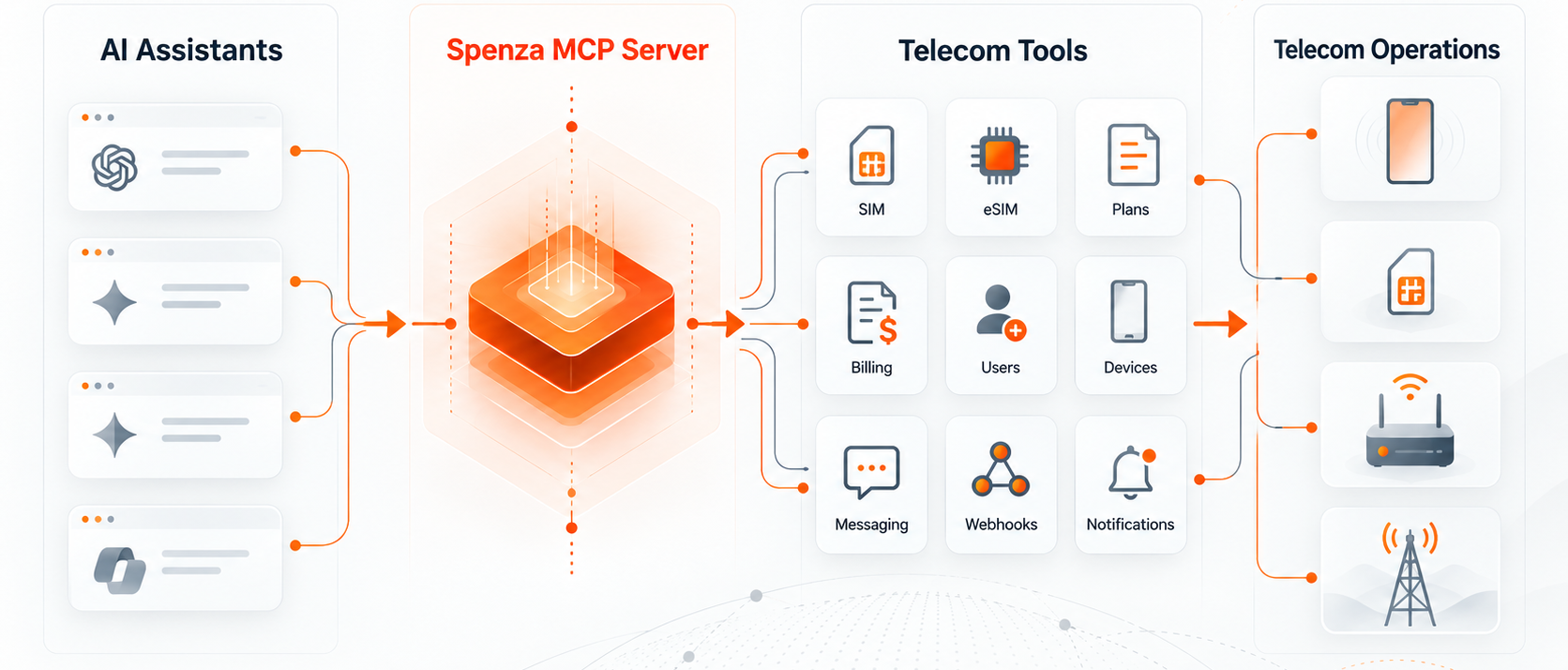
The Spenza MCP Server is live at mcp.spenza.com. Connect it to Claude, ChatGPT, Cursor, VS Code or any MCP client, and the model can do what the Spenza Partner API does: list and inspect SIMs, provision eSIMs, buy and schedule plans, pull invoices, register webhooks, send SMS, and 70-odd other operations against your live account.
Most telecom MCP servers available today are documentation search. Twilio’s hosted server, for example, indexes API specs and does not execute calls; it helps an agent write the integration, not run it. Spenza’s server executes. Ask “which SIMs on the fleet are past 80% of their data allowance this cycle, and pause data on the ones assigned to contractors“, and the assistant lists the SIMs, checks usage, and calls the service-state tool for each one, with you approving every write.
This post covers what the server exposes, how to connect it in under two minutes, five workflows we run on our own account, and how to call it from code. There is an FAQ at the end for the questions we keep getting.
Why we built it
Connectivity operations still run on dashboards, tickets and CSV exports. An ops lead who wants to know which lines are idle, who is about to overrun a plan, or why a webhook stopped delivering opens three screens, exports two files, and reconciles them in a spreadsheet. If the answer calls for action, someone raises a ticket and a second person clicks through the console.
We built the Partner API so that partners could put that work in their own systems. The API is consistent by design: one response envelope, one pagination scheme, one error taxonomy, idempotency keys on writes, and one async pattern for anything that takes real-world time. That consistency is exactly what a language model needs to use an API well, so wrapping it as an MCP server was a short step.
The result changes who can operate the platform. An analyst who has never opened the API reference can ask a question in plain English and get an answer sourced from live data. A support engineer can resolve a “my eSIM won’t activate” ticket by asking the assistant to check the provisioning transaction, read the failure reason, and re-fetch the activation QR. A finance lead can pull last quarter’s invoices into a summary without waiting on engineering.
For developers it changes something else: an agent you build on Claude, OpenAI or any MCP-aware framework can now hold a Spenza account as a capability, not a bespoke integration. The Agentic MVNO we have been describing, three hubs plus the AI agents that run them, needs a surface that agents can call directly. This server is that surface.
What the server exposes
The server publishes 79 tools that map one-to-one onto the Partner API: 39 reads and 40 writes across 15 resource groups. Tool names follow a verb_noun convention (list_sims, get_sim_usage, provision_esim), so a model can guess most of them before it reads the schema.
| Resource Group | Tools | What the Assistant Can Do | Reference |
|---|---|---|---|
| SIMs | 7 | List and search inventory, read live status, check usage against the current plan, assign a SIM to a user, renew a number, and read or change voice, SMS, and data service state. | SIMs |
| Subscriptions | 3 | List subscriptions, read the plan attached to a SIM, and cancel at the end of the current billing period. | Subscriptions |
| Plans and Catalog | 5 | Browse plans and SIM products, purchase immediately, or schedule purchases using synchronous or asynchronous operations. | Plans |
| eSIM | 4 | Provision an eSIM with or without a plan, check number availability by ZIP code, fetch the activation QR code, and check provisioning status. | eSIM |
| Billing | 5 | List and read invoices, retrieve the PDF link, check prepaid credit, and create a top-up checkout. | Billing |
| Orders and Transactions | 3 | View order history, order details, charges, and refunds. | Orders |
| Users | 5 | Create, read, update, and remove the end users who hold lines. | Users |
| Devices | 4 | View the device catalog and details, and assign or unassign devices. | Devices |
| Device, SIM and User Groups | 21 | Create, update, and delete groups with spend and data limits, and move members into or out of groups. | Groups |
| Team Members | 5 | Invite administrators, change role tiers, and remove team members. | Team |
| Numbers and Port-In | 2 | Check port-in eligibility and list port-in requests. | Port-in |
| Messaging | 1 | Send an SMS from a provisioned number. | SMS |
| Webhooks | 8 | Register, update, and delete webhooks, send a test event, list deliveries, and redeliver events. | Webhooks |
| Notifications | 5 | List notifications, mark them as read, and read or change the notification preference matrix. | Notifications |
| Async Status | 1 | Poll any transactionId returned from a purchase, provisioning, top-up, or port-in operation. |
Async |
Every tool carries the same guardrails the API does. Writes take an idempotency key, so a retried call replays instead of repeating. Anything slow (eSIM provisioning, a Stripe checkout, a port-in) returns a transactionId immediately, and the assistant polls get_async_transaction_status until it resolves. Errors come back as a typed code (SIM_NOT_FOUND, RATE_LIMITED, VALIDATION_ERROR) rather than a message the model has to parse. See Core Concepts and Errors for the full contract.
The tool descriptions also carry the sharp edges the docs call out, because a model reads descriptions before it reads reference pages. cancel_subscription says it always cancels at the end of the billing period. purchase_plan_async says to give exactly one of activateNow or scheduleDate. update_sim_service_state says it charges an action fee on success. Those lines exist so an assistant does not have to learn them by failing.
Connect in under two minutes
The server is remote and hosted by Spenza, so there is nothing to install. It speaks MCP over Streamable HTTP at https://mcp.spenza.com/mcp and authenticates with the same API key and secret your partner account already uses for the Partner API. Credentials are issued when your account is set up; if you do not have a pair, ask support.
Keep the key and secret in environment variables. Every snippet below reads them from SPENZA_API_KEY and SPENZA_API_SECRET.
Claude Code
claude mcp add --transport http spenza https://mcp.spenza.com/mcp \
  -H "X-Spenza-Api-Key: $SPENZA_API_KEY" \
  -H "X-Spenza-Api-Secret: $SPENZA_API_SECRET" \
  --scope user
Run /mcp inside Claude Code to confirm the server shows as connected, then ask it something: “how many SIMs on this account are unassigned?”
Claude (web and desktop)
Open Settings, choose Connectors, then Add custom connector. Paste https://mcp.spenza.com/mcp, complete the credential prompt, and the Spenza tools appear in the tool menu for every new chat. Team and Enterprise admins can add the connector once for the whole organisation.
Cursor
Add this to ~/.cursor/mcp.json (global) or .cursor/mcp.json in a project:
{
  "mcpServers": {
    "spenza": {
      "url": "https://mcp.spenza.com/mcp",
      "headers": {
        "X-Spenza-Api-Key": "${env:SPENZA_API_KEY}",
        "X-Spenza-Api-Secret": "${env:SPENZA_API_SECRET}"
      }
    }
  }
}
VS Code (Copilot agent mode)
Add .vscode/mcp.json to the workspace. The inputs block makes VS Code prompt for the secret once and store it encrypted, so nothing sensitive lands in the repo:
{
  "inputs": [
    { "id": "spenza-key", "type": "promptString", "description": "Spenza API key" },
    { "id": "spenza-secret", "type": "promptString", "description": "Spenza API secret", "password": true }
  ],
  "servers": {
    "spenza": {
      "type": "http",
      "url": "https://mcp.spenza.com/mcp",
      "headers": {
        "X-Spenza-Api-Key": "${input:spenza-key}",
        "X-Spenza-Api-Secret": "${input:spenza-secret}"
      }
    }
  }
}
ChatGPT
Turn on Developer mode under Settings, Connectors, then create a connector with the server URL. ChatGPT lists the Spenza tools and asks before each write.
Any other MCP client
Anything that supports remote servers over Streamable HTTP with custom headers works the same way: Windsurf, Zed, Cline, OpenCode, Goose, n8n’s MCP client node, and the official MCP Inspector. Point it at the URL, pass the two headers, done.
One verification step we recommend for every client: ask the assistant to call get_credit_balance. It is a harmless read, it proves auth works, and the number it returns should match your dashboard.
Five workflows we run on our own account
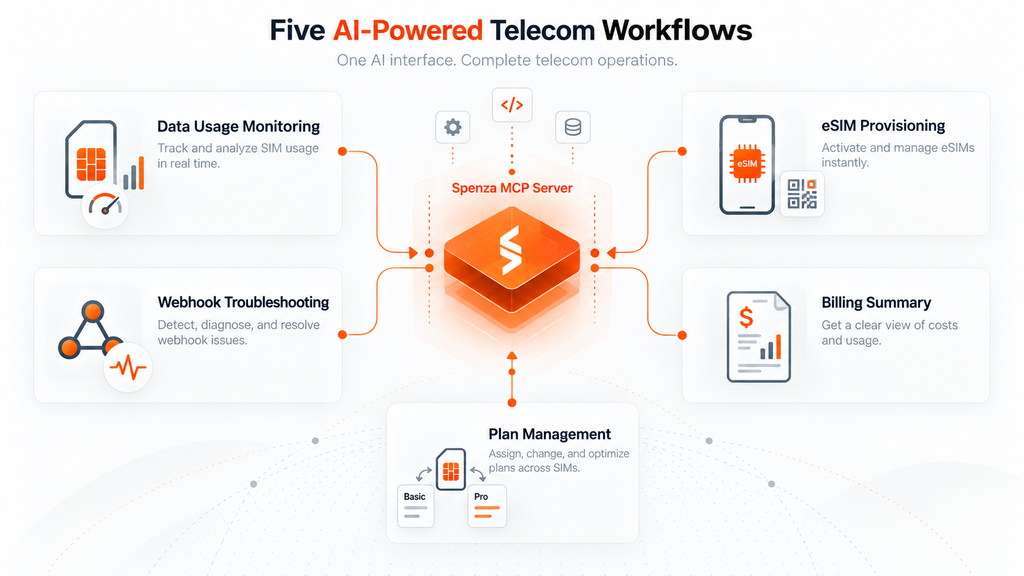
Each of these is a single prompt. The tool chain underneath is what the assistant actually calls, in order, and it is the same chain you would write by hand against the API.
1. Usage triage before the cycle closes
Show me every active SIM past 80% of its data allowance this cycle, with the assigned user and department. Then pause data on any that belong to contractors.
list_simswithstatus: ACTIVE, paged at 100get_sim_usagefor each SIM, comparingdata.usedto the plan allowanceget_userfor the assignee to read the departmentupdate_sim_service_statewithdata: falseon the contractor lines, one confirmation per SIM
The first three steps are reads and run without prompts. Step four charges an action fee, and the tool description says so, which is why every client we have tested stops and asks before running it.
2. Provision an eSIM for a new hire
Provision an eSIM for Priya Nair’s new iPhone, IMEI 356938035643809, on the AT&T 5GB plan, activate today, and give me the activation QR.
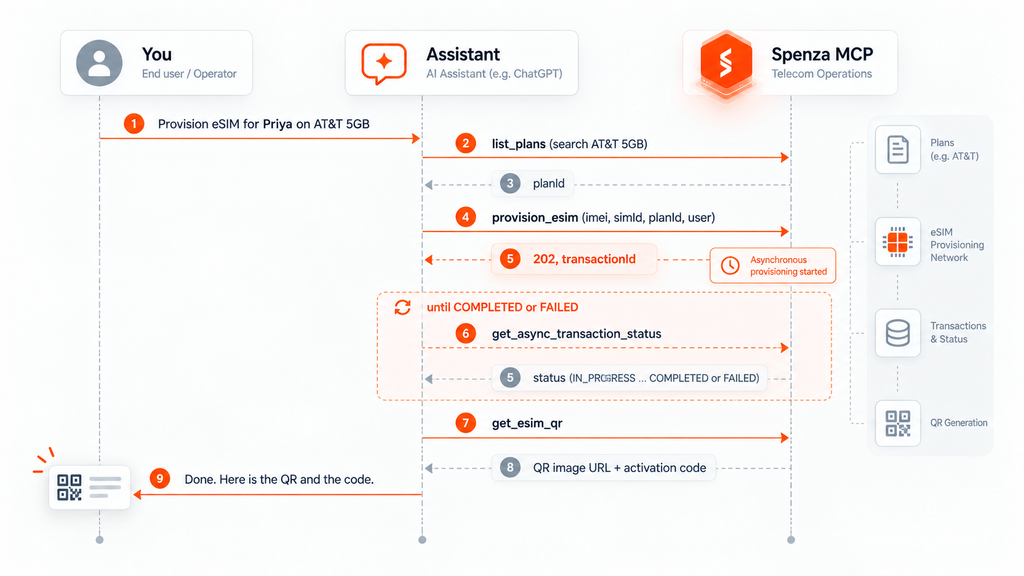
Provisioning is asynchronous on the API, so the assistant polls rather than assuming success. If the carrier rejects the IMEI or the ZIP code has no number available, the failure reason arrives on the status call and the assistant reports it instead of handing over a QR that will never activate.
3. A webhook stopped delivering
Our inbound SMS webhook stopped firing yesterday afternoon. Find out why and get the missed events redelivered.
list_webhooksto find the registration and confirm it is stillactivelist_webhook_deliveriesto see the attempts, newest first, and read the failure status codestest_webhookto send a signed synthetic event and check the endpoint is reachable nowredeliver_webhook_deliveryfor each failed attempt, using the stored original payload
The delivery log records the HTTP status of every attempt, so a 401 from a rotated token on your side or a 5xx from a bad deploy shows up in the first pass. Redelivery replays the stored original payload rather than regenerating the event, and it runs on a queue, so the assistant checks the deliveries list again a minute later to confirm the retries landed.
4. Month-end billing summary
Summarise September invoices by status with totals, list anything open for more than 30 days, and tell me the prepaid balance.
list_invoiceswithfrom: 2026-09-01andto: 2026-09-30get_invoicefor the open ones, to read due dates and line itemsget_credit_balance
If you then say “top up $500”, the assistant calls create_credit_top_up, which returns a hosted Stripe checkout link. A human completes the payment. The model never holds a card number, and the top-up only completes when Stripe’s webhook fires.
5. Move a group to a new plan next cycle
Move every SIM in the Field Sales group to the 10GB plan, effective the first of next month.
get_sim_groupto read the membershiplist_plansto resolve the exactproductNamepurchase_plan_asyncper SIM withscheduleDateset to the first of the monthget_async_transaction_statusto confirm each purchase is scheduled
Because writes accept an idempotency key, a retry after a timeout does not schedule the plan twice. That is the difference between an assistant you let touch 12 SIMs and one you let touch 1,200.
For builders: call it from code
The chat clients above are the fastest way to try the server. The more durable use is an agent you own: a nightly usage check that posts to Slack, a support bot that resolves eSIM tickets, an onboarding flow that provisions a line the moment HR creates an employee. All three major paths work today.
Anthropic Messages API
The MCP connector takes the server URL and a bearer token. Exchange your key and secret for a token at POST /api/v1.1/auth/token (it lasts an hour, so refresh it in your job), then pass it as authorization_token. The mcp_toolset block below disables the money-moving and destructive tools so this particular agent can only read and report:
import anthropic, os

client = anthropic.Anthropic()

response = client.beta.messages.create(
    model="claude-opus-5-5",
    max_tokens=2048,
    betas=["mcp-client-2025-11-20"],
    mcp_servers=[{
        "type": "url",
        "url": "https://mcp.spenza.com/mcp",
        "name": "spenza",
        "authorization_token": os.environ["SPENZA_TOKEN"],
    }],
    tools=[{
        "type": "mcp_toolset",
        "mcp_server_name": "spenza",
        "configs": {
            "purchase_plan": {"enabled": False},
            "purchase_plan_async": {"enabled": False},
            "cancel_subscription": {"enabled": False},
            "create_credit_top_up": {"enabled": False},
            "delete_user": {"enabled": False},
            "delete_webhook": {"enabled": False},
        },
    }],
    messages=[{
        "role": "user",
        "content": "List every active SIM above 80% of its data allowance this cycle. Return ICCID, assignee, used GB and allowance GB as a table.",
    }],
)

print(response.content[-1].text)
With 79 tools on one server, set default_config: {"defer_loading": true} and pair it with Anthropic’s tool search tool so only the relevant descriptions enter the context on each turn.
OpenAI Responses API
The mcp tool type works the same way. Here require_approval waives approval for the read tools and keeps it for every write, so your application sees an mcp_approval_request before anything changes on the account:
from openai import OpenAI
import os

client = OpenAI()

READ_ONLY = [
    "list_sims", "get_sim", "get_sim_usage", "list_subscriptions",
    "list_invoices", "get_invoice", "get_credit_balance",
    "list_orders", "list_users", "get_user", "get_async_transaction_status",
]

resp = client.responses.create(
    model="gpt-6-astra",
    tools=[{
        "type": "mcp",
        "server_label": "spenza",
        "server_description": "Spenza connectivity: SIMs, eSIM, plans, billing, webhooks.",
        "server_url": "https://mcp.spenza.com/mcp",
        "authorization": os.environ["SPENZA_TOKEN"],
        "require_approval": {"never": {"tool_names": READ_ONLY}},
    }],
    input="Which invoices from the last 60 days are still open, and what is the total outstanding?",
)

print(resp.output_text)
Direct MCP client (TypeScript)
If you run your own agent loop, or you want the API key and secret headers rather than a bearer token, connect with the MCP TypeScript SDK and call tools yourself. This is also the path for n8n, LangGraph, or a cron job that never talks to a model at all:
import { Client } from "@modelcontextprotocol/sdk/client/index.js";
import { StreamableHTTPClientTransport } from "@modelcontextprotocol/sdk/client/streamableHttp.js";

const transport = new StreamableHTTPClientTransport(
  new URL("https://mcp.spenza.com/mcp"),
  {
    requestInit: {
      headers: {
        "X-Spenza-Api-Key": process.env.SPENZA_API_KEY!,
        "X-Spenza-Api-Secret": process.env.SPENZA_API_SECRET!,
      },
    },
  },
);

const client = new Client({ name: "fleet-watch", version: "1.0.0" });
await client.connect(transport);

const { tools } = await client.listTools();
console.log(`${tools.length} tools`); // 79

const usage = await client.callTool({
  name: "get_sim_usage",
  arguments: { iccid: "8901260123456789012", history: true },
});
console.log(usage.content);
The same transport object plugs into Anthropic’s client-side MCP helpers (mcpTools with the tool runner) or OpenAI’s Agents SDK, so you can start with a hand-rolled loop and hand the tool list to a model later without changing the connection.
Security and guardrails
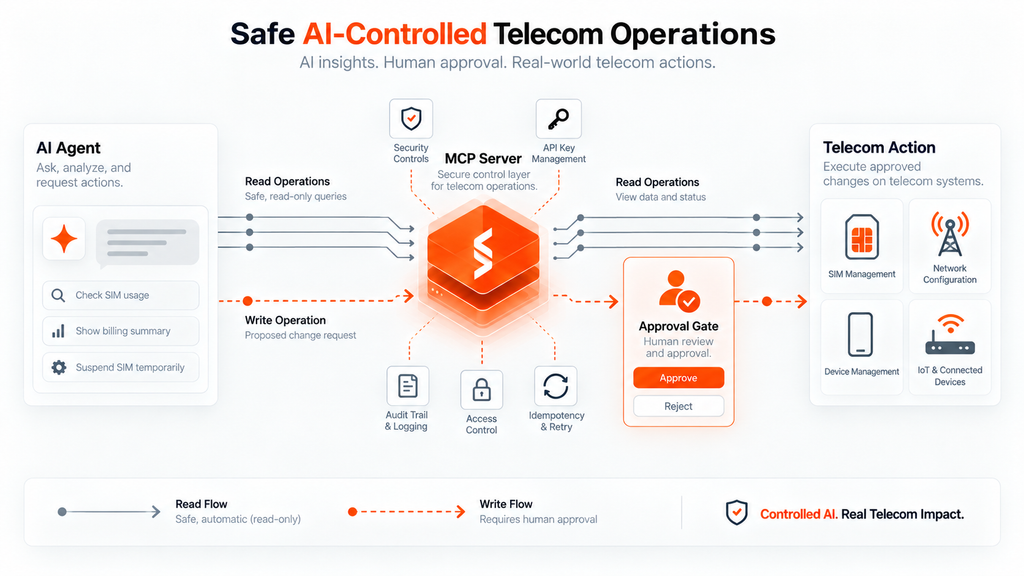
An MCP server that can buy plans and cancel subscriptions needs more than a password. Here is how the Spenza server is scoped, and what we recommend on your side.
Account-scoped by construction. The credentials identify one partner account, and every tool is scoped to it. A SIM on another account returns the same SIM_NOT_FOUND as a nonexistent one; there is no cross-tenant read path for the model to stumble into.
Role tiers carry through. The API enforces role tiers on the credential the same way the dashboard does; send_sms, for example, requires the Admin tier. Each partner account has one key and secret pair today, so treat that pair as an admin credential and put any read-only restriction in the client, with the allowlists and approvals described below, rather than expecting a lesser key.
Writes are idempotent. Every write accepts an idempotency key, so a retried tool call replays the original result instead of provisioning a second eSIM or scheduling a second purchase.
Money never passes through the model. create_credit_top_up returns a hosted Stripe checkout link. The assistant cannot enter a card, and the transaction only completes when Stripe’s webhook fires. The same applies to plan purchases: they draw on prepaid credit or invoice terms already on the account, never on a payment method the model supplies.
Rate limits are per account, not per client. The API allows 120 requests per 60-second window by default, with tighter caps on carrier-facing writes: 60 per minute for plan purchase and eSIM provisioning, 30 for SMS and cancellation, 20 for number renewal and top-up, 10 for webhook tests. An assistant that fans out get_sim_usage across 1,000 SIMs will hit the ceiling; the server returns RATE_LIMITED with a Retry-After header, and the well-behaved clients back off on their own.
On your side, three habits cover most of the risk:
- Keep approvals on for writes. Claude, ChatGPT, Cursor and VS Code all ask before a tool call by default. Leave that on for anything that is not a
list_orget_. If you build with the API, use the allowlist and approval patterns shown above. - Rotate the credential like a password. The key and secret are the only thing between the model and the account. Store them in a secrets manager, never in a repo or a shared chat, and ask support to rotate them the moment you suspect exposure.
- Log what the assistant did. The Partner API’s orders and transactions endpoints are the audit trail for anything that cost money; the webhook deliveries list is the trail for events. An assistant that made a change can also tell you what it called, so ask it.
One limitation to be clear about: there is no sandbox environment yet. Every call from the MCP server goes to production, the same as the API. A sandbox is on the roadmap; until it ships, test write tools on a SIM you would be comfortable re-provisioning.
Where this fits, and what comes next
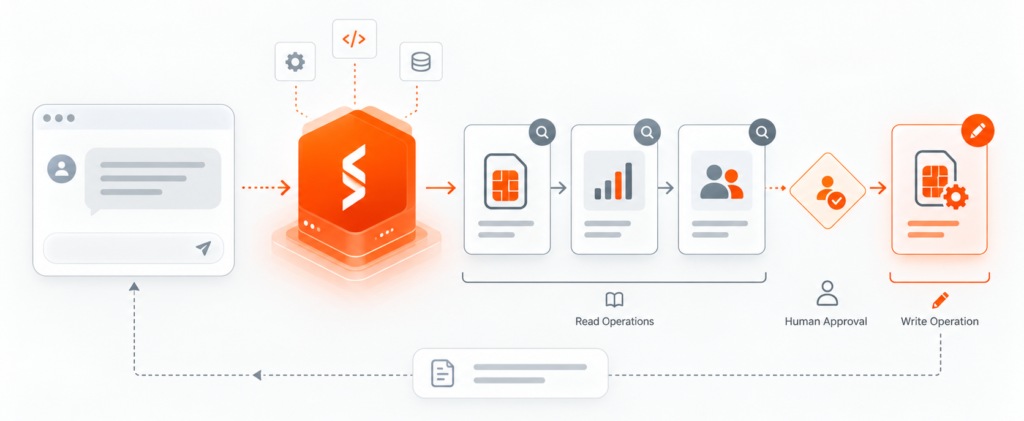
We describe Spenza as an Agentic MVNO: TelecomHub for multi-operator connectivity, ControlHub for provisioning, policy and billing, UXHub for the customer-facing surface, and a fourth layer of AI agents that operate the other three. Until now that fourth layer was something we built for ourselves and for individual customers. The MCP server makes it something you can build with whatever model and framework you already run.
That matters most for the three kinds of companies we work with. A connected-device OEM can put connectivity operations inside the same assistant its support team already uses, so “why is this device offline?” resolves without a telecom specialist. An MSP or connectivity provider can give each account manager an agent that answers billing and usage questions against live data instead of last month’s export. A software platform embedding mobile lines can let its own product agent provision, suspend and bill without a bespoke integration for every carrier.
Three gaps are open today and are the first things on the list:
- A sandbox. Every call goes to production. A sandbox base URL for the API and the MCP server is the most requested item from early users and is on the roadmap.
- Port-in submission. The server exposes eligibility checks and port-in listing; submitting a port-in still goes through the API endpoint until the confirmation flow is safe enough to hand to a model.
- Typed SDKs. There are no official client libraries yet. The OpenAPI spec at
docs.spenza.com/openapi.yamlgenerates a clean client today, and published packages will follow.
If you connect the server and find a tool you needed that is not there, or a description that led the model somewhere wrong, tell us at support@spenza.com. Tool descriptions are the interface now, and we will keep editing them the way we edit docs.
Get started
The Spenza MCP Server is live at https://mcp.spenza.com/mcp. If you have a partner account, the Claude Code line at the top of the connection section is the whole setup; run it, then ask your assistant for the credit balance. If you do not have an account yet, book time with us and we will provision one with the API and MCP credentials ready on day one.
What we would like to see: the first workflow you replace a dashboard with. Send it to support@spenza.com and we will feature the best ones in a follow-up post.


